Timeline Visualizer Workflow: Create Offline Animated Travel Maps
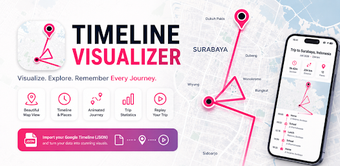
Timeline Visualizer Workflow by Seltra Regi converts exported Google Timeline JSON into animated travel videos and interactive maps on Android devices. The app imports Timeline JSON files and renders MP4 animations plus map overviews, while offering flexible date filters. It exposes controls for resolution, frame rate, zoom style, and playback speed, and processes location data locally to protect privacy. Travelers and tourists who keep location history get a private way to document journeys.
How does the app convert Timeline exports into visual narratives?
The app parses exported Google Timeline JSON and maps timestamped coordinates to chronological frames, turning complex JSON structures into a travel narrative. It aligns location points into continuous paths, composes segments into a timeline sequence, and renders the result as an MP4 animation and an interactive map overview so movement appears as an ordered visual story instead of raw coordinates.
Does processing keep sensitive location files off external servers?
Processing happens entirely on the Android device, so location files are not uploaded to external servers and remain under the user's control. The offline workflow handles import, rendering, and file writes locally, and finished media is stored in the device gallery for export or sharing without leaving the phone, reducing external exposure of sensitive coordinate data.
Can non-technical users complete the export-import-render workflow?
The app supplies a guided setup with step-by-step instructions for exporting Timeline data from Google and importing it into the tool, which helps users through the necessary export step. That guided flow covers date selection and route previewing, making the basic sequence accessible to travelers who are familiar with their location history but not comfortable with raw JSON files.
Do the customization controls satisfy advanced export requirements?
Advanced Video Customization exposes controls so users can tune output for different platforms. Available settings include:
- resolution and aspect ratio
- frame rate and playback speed
- camera zoom and smoothing
Best for privacy-minded travelers willing to tweak export settings
The app suits travelers and creators who want device-based travel visualizations and are prepared to experiment with export parameters to shape pacing and look. Because the tool imports JSON from mobile storage, keep separate exported files for each trip so you can assemble multi-day compilations later; expect an initial setup and testing phase before final renders. Recommended.